The Hidden Technical SEO Bottlenecks Ruining Your WordPress Rankings

The Hidden Technical SEO Bottlenecks Ruining Your WordPress Rankings

SEO, WordPress

You publish high-quality content, build solid back-links, and meticulously optimize your on-page keywords. Yet, your WordPress site’s rankings suddenly flat line—or worse, disappear overnight after a core update.

When your content strategy is flawless but your traffic drops, the culprit is almost always invisible to the naked eye. Google is increasingly unforgiving of poor site architecture. If Google-bot struggles to crawl, render, or interact with your pages, your content will never see page one.

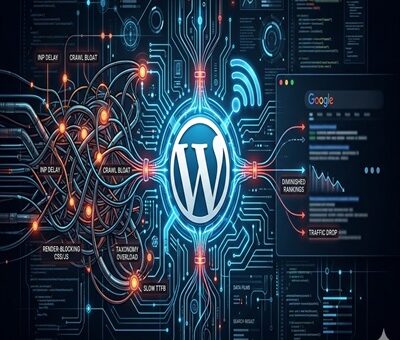
Here are the hidden technical SEO bottlenecks that are silently sabotaging your WordPress rankings, and exactly how to fix them.
1. Failing the INP (Interaction to Next Paint) Test

As of recently, Interaction to Next Paint (INP) has completely replaced FID as a primary Core Web Vital. INP measures how quickly your site responds to user clicks and taps.

If your WordPress site relies on heavy page builders (like older versions of Elementor or Divi) or loads excessive third-party tracking scripts, your server’s main thread gets blocked. When a user clicks a menu item and nothing happens for 300 milliseconds, Google penalizes the page for poor user experience.

The Fix: Delay JavaScript execution for non-essential scripts, optimize your CSS delivery, and ensure your caching plugin (like WP Rocket or Lite Speed Cache) is properly configured to minify and combine files.

2. Running Legacy Server Environments

A surprisingly common bottleneck is an outdated server environment. Your WordPress site might look modern on the front end, but if the back end is running on an outdated PHP version, your time-to-first-byte (TTFB) will suffer drastically.

Older PHP versions process requests slowly, which limits how many pages Google-bot can crawl during its allocated time. Upgrading your server environment to PHP 8.4 delivers massive improvements in code execution speed and resource management, significantly reducing server response times and keeping Google’s crawlers happy.
3. The Crawl Budget Black Hole (Taxonomy Bloat)

WordPress is notorious for auto-generating unnecessary pages. Every time you create a new tag, author, or date archive, WordPress creates a new URL. Over time, a site with 50 strong blog posts can easily spawn 500+ low-value archive pages.

When Google-bot visits your site, it only has a limited “crawl budget.” If it spends all its time crawling empty tag pages and pagination links, it might skip crawling your newly updated, high-value service pages or cornerstone articles.

The Fix: Audit your index coverage in Google Search Console. Use an SEO plugin like Rank Math or Yoast to set tags, author archives, and date archives to no-index. Keep Google-bot strictly focused on your money pages.

4. Hidden Render-Blocking Resources

When Google renders your page, it wants to see the most important above-the-fold content immediately. If your WordPress theme forces the browser to download a massive, unoptimized CSS file or a custom font before it displays text, you have a render-blocking issue.

The Fix: Preload your critical fonts and inline your critical CSS. Most modern WordPress performance plugins have a “Generate Critical CSS” feature that automatically isolates the styling needed for the top of your page, allowing the rest to load in the background.

5. Orphaned Pages and Broken Internal Architecture

Technical SEO isn’t just about speed; it’s about how your site is wired together. An “orphan page” is a page on your site that has no internal links pointing to it. If you don’t link to a page, Google assumes it isn’t important and will slowly de-index it.

The Fix: Run a site crawl using a tool like Screaming Frog or Ah-refs Site Audit. Identify high-value pages that lack internal links and weave them into your older, high-authority blog posts. A strong, logical internal linking structure spreads “link juice” evenly and helps search engines understand your topical authority.

Final Thoughts: Clean House to Reclaim Your Traffic

Recovering from a ranking drop requires patience and a highly technical approach. Before you write another 2,000-word blog post, look under the hood. By clearing out code bloat, optimizing your server environment, and strictly managing your crawl budget, you clear the path for Google to recognize and reward your true expertise.

Toptal vs. Upwork vs. Ajay Maanju

Why Most WordPress Sites Fail Core Web Vitals — And How I Fix Them for Clients

Why Most WordPress Sites Fail Core Web Vitals — And How I Fix Them for Clients

WordPress

Why Most WordPress Sites Fail Core Web Vitals — And How I Fix Them for Clients

Core Web Vitals have officially become one of the biggest ranking factors in Google’s Page Experience update. But here’s the wild part — most WordPress sites still fail Core Web Vitals badly, even if the design looks clean.

As someone who works on WordPress speed optimization projects daily, I see the same mistakes repeated across small business websites, agencies, and even premium themes.

Let me break down why WordPress sites fail Core Web Vitals — and how I fix these issues for my clients.


 What Are Core Web Vitals (Quick Breakdown)

Core Web Vitals measure real-world user experience based on three metrics:

1️⃣ LCP — Largest Contentful Paint

How fast the main content loads.

2️⃣ FID / INP — Interaction Delay

How quickly a page reacts when users click.

3️⃣ CLS — Cumulative Layout Shift

How stable the layout stays while loading.

If any of these fail, your site:
❌ drops in rankings
❌ loses conversions
❌ gets lower user engagement


❌ Why Most WordPress Sites Fail Core Web Vitals

1. Bloated Themes and Page Builders

Most WordPress themes come loaded with features you never use. And when you stack Elementor, WPBakery, Divi, etc., the site becomes heavy AF.

Result:
Slow LCP, high INP, and terrible CLS.


2. Too Many Plugins (Plugin Overload)

I’ve seen sites with 40+ plugins… half of them doing nothing.

Each plugin adds:
⚠️ scripts
⚠️ CSS files
⚠️ database queries

This destroys Core Web Vitals.


3. No Proper Image Optimization

Big PNG/JPG images = slow LCP.
Clients upload 5MB images without even realizing it.

The site suffers instantly.


4. Render-Blocking JS & CSS

Common culprits:

  • jQuery

  • sliders

  • animation libraries

  • embed scripts

  • unused theme files

If these load before page content → LCP fails.


5. Poor Hosting & No Server-Level Caching

Cheap hosting = slow TTFB.
Slow TTFB = slow everything.

This alone can cause a “Needs Improvement” score on all Vitals.


6. Layout Shifts Caused by Ads, Sliders & Fonts

CLS is usually bad because:

  • images have no fixed dimensions

  • popups slide in

  • fonts swap

  • banners load late

This makes the page jump around.


🛠️ How I Fix Core Web Vitals for My Clients (My Exact Process)

1. Clean & Lightweight Theme Setup

I switch clients to:
✔️ Block Themes
✔️ GeneratePress
✔️ Astra
✔️ Kadence

Light, stable, fast.

If they want to stick with Elementor → I trim the bloat.


2. Remove Unnecessary Plugins

I audit the site and remove:

  • duplicate functionality

  • inactive plugins

  • outdated scripts

Then replace them with light alternatives.


3. WebP + Next-Gen Image Optimization

I optimize images using:
✔️ WebP
✔️ AVIF
✔️ proper sizing
✔️ lazy loading
✔️ CDN delivery

Big improvement in LCP.


4. Minify, Delay & Defer JS/CSS

I use:

  • Cloudflare

  • WP Rocket

  • Fast Velocity Minify

  • Perfmatters

Tricks I apply:
🔥 delay non-essential JS
🔥 remove unused CSS
🔥 inline critical CSS
🔥 defer scripts that block rendering

This improves both LCP & INP massively.


5. Server-Level Optimization

I move clients to hosts like:

  • Cloudways

  • Hostinger Premium

  • A2 Hosting Turbo

  • WPEngine

Then activate:
✔️ Redis caching
✔️ Brotli compression
✔️ HTTP/3
✔️ Full-page caching

TTFB drops like magic.


6. Fix CLS by Stabilizing Layout

I add:

  • width/height attributes to images

  • skeleton loaders

  • preloaded fonts

  • stable header structure

This eliminates those annoying jumps.


📈 Real Results I Usually Achieve for Clients

After optimization, most websites go from:
45–60 score → 90+ on desktop & 75–95 on mobile

And yes — this directly helps with:
🔹 higher Google rankings
🔹 better conversions
🔹 lower bounce rates
🔹 smoother user experience


 Final Thoughts

Most WordPress sites don’t fail Core Web Vitals because WordPress is bad — they fail because they’re built carelessly.

Once optimized properly, WordPress becomes one of the fastest CMS platforms available.

If you want help improving your Core Web Vitals, feel free to reach out — I fix these issues for clients every day.

How to Improve Website Speed

Why Every Business Needs a WordPress Developer

SEO Trends in 2025: What Google Really Wants

SEO Trends in 2025: What Google Really Wants

SEO

The SEO world is evolving fast. With AI, voice search, and Google’s smarter algorithms, ranking in 2025 means more than keywords. Businesses — especially small IT companies — must create trust-driven, high-value content. So, what does Google really want in 2025? Let’s break it down.

1. AI-Powered SEO Is the New Normal

In 2025, AI drives almost every part of Google’s algorithm. Search is intent-based, not keyword-based, and Google rewards authentic, helpful content written for humans first. Schema markup, author info, and timestamps all boost trust and visibility.

  • Use AI tools for topic research, but write manually for natural tone.
  • Add schema markup for FAQs and authorship.

Read SEO.com’s 2025 SEO trends report

2. Zero-Click Searches and Featured Snippets Dominate

Over 60% of searches end without a click. To win visibility, optimize content for featured snippets and People Also Ask sections.

  • Write short Q&A sections.
  • Use bullet points, tables, and lists.
  • Add structured FAQ data to pages.

Check out Semrush’s SEO Trends 2025

3. Voice, Visual, and Video Search Are Exploding

Users no longer just type — they talk and search visually. Voice searches are conversational, image SEO depends on good alt text, and video SEO relies on transcripts and metadata.

Instead of “IT company Jaipur,” users now ask:
“What’s the best IT support company in Jaipur for small businesses?”

Learn more about Google Visual SEO

4. UX and Technical SEO Are Non-Negotiable

Google’s Core Web Vitals remain crucial in 2025. Optimize for speed, mobile performance, and clean site structure.

  • Ensure your site loads in under 2.5 seconds.
  • Maintain mobile responsiveness and HTTPS security.
  • Use internal links to guide users naturally.

Google Core Web Vitals Guide

5. E-E-A-T and Topical Authority Rule Rankings

Experience, Expertise, Authoritativeness, Trustworthiness (E-E-A-T) define content quality in 2025. Prove real experience through case studies and author credentials.

  • Create content clusters like “Managed IT Services Jaipur,” “Benefits,” and “Case Study.”
  • Update posts regularly to show freshness.

Read Moz’s Guide to E-E-A-T

6. Long-Tail Keywords Beat Broad Terms

Forget generic terms — long-tail keywords are what drive conversions. They match user intent and are easier to rank for.

  • Example: Instead of “IT services,” try “Affordable managed IT support in Jaipur.”
  • Answer “how,” “when,” and “should I” queries.

Ahrefs Keyword Research Guide

7. Local SEO Gets Even Smarter

Google is focusing more on local intent. Optimize your business for location-based searches to attract nearby clients.

  • Keep your Google Business Profile updated.
  • Encourage reviews from local customers.
  • Use geo-targeted keywords like “Jaipur IT support .”

Google Business Profile Tips

8. Multi-Format, Evergreen Content Wins

Content variety and consistency are key. Blend blogs, videos, infographics, and downloadable guides. Update older content regularly to keep it evergreen.

9. The Future of SEO: Build Trust, Not Just Traffic

Google now values trust, engagement, and satisfaction more than raw clicks. Optimize for user experience and helpfulness instead of just rankings.

  • Track bounce rate and dwell time.
  • Improve internal linking to reduce drop-offs.
  • Offer transparent, expert-level information.

Read more at Search Engine Journal

Conclusion: Adapt Fast or Fade Out

SEO in 2025 is about authenticity, expertise, and adaptability. Focus on intent, value, and speed — and you’ll gain both Google’s and your audience’s trust.

Start today: audit your site, refresh old blogs, and aim for featured snippets. The earlier you adapt, the longer you stay visible.

Audit Your Website Free

How to Make WordPress Websites Lightning Fast in 2025

How to Make WordPress Websites Lightning Fast in 2025

WordPress

In today’s fast-paced digital world, website speed is everything. A slow-loading WordPress site doesn’t just frustrate users—it hurts SEO rankings, reduces conversions, and lowers engagement. As we move into 2025, Google’s Core Web Vitals have made speed optimization more important than ever.

The good news? With the right strategies, you can make your WordPress website lightning fast. Let’s explore step-by-step techniques to speed up your site.


1. Choose a High-Performance Hosting Provider

Your hosting provider is the foundation of your website’s performance. A slow server will bottleneck your efforts, no matter how much optimization you do.

  • Opt for managed WordPress hosting like Kinsta, WP Engine, or SiteGround.

  • Look for SSD/NVMe storage and server-level caching.

  • Consider CDN integration for global reach.


2. Use a Lightweight WordPress Theme

Bloated themes slow down websites. Instead, go for minimal, performance-focused themes such as:

  • GeneratePress

  • Astra

  • Kadence

  • Block-based WordPress themes

These themes are optimized for speed while remaining flexible for customization.


3. Optimize Images Like a Pro

Images are often the biggest culprits in slow-loading sites.

  • Use next-gen formats like WebP or AVIF.

  • Compress images with tools like Smush or Imagify.

  • Implement lazy loading so images load only when users scroll to them.


4. Install a Caching Plugin

Caching drastically reduces load times by storing static versions of your pages.
Top WordPress caching plugins:

  • WP Rocket (premium but powerful)

  • W3 Total Cache (free)

  • LiteSpeed Cache (great for LiteSpeed servers)


5. Use a Content Delivery Network (CDN)

A CDN delivers your website’s files from servers closest to the user, improving speed worldwide. Popular CDNs include:

  • Cloudflare

  • BunnyCDN

  • KeyCDN


6. Minify & Combine CSS, JS, and HTML

Unnecessary code slows down rendering. Use tools like:

  • Autoptimize

  • Asset CleanUp

  • WP Rocket’s file optimization

This will reduce file sizes and improve loading speed.


7. Clean Up Your Database

Over time, WordPress databases collect unnecessary data—like post revisions, transients, and spam comments.

  • Use plugins like WP-Optimize or Advanced Database Cleaner.

  • Schedule automatic cleanups to maintain performance.


8. Limit Plugins and External Scripts

Too many plugins = slower performance.

  • Only install essential plugins.

  • Avoid plugins that duplicate functionality.

  • Host fonts locally and minimize third-party scripts like tracking codes.


9. Enable GZIP or Brotli Compression

Compression reduces file sizes before sending them to the browser.

  • Check with your host or enable via caching plugins.

  • Use Brotli if your host supports it—it’s even faster than GZIP.


10. Monitor Performance Regularly

Optimization is not a one-time task. Continuously monitor site speed with tools like:

  • Google PageSpeed Insights

  • GTmetrix

  • Pingdom

  • WebPageTest

Regular audits help you catch new bottlenecks early.


Conclusion

A fast WordPress website isn’t just a luxury in 2025—it’s a necessity. By choosing the right hosting, optimizing images, using caching, and keeping your site lean, you’ll not only improve user experience but also rank higher on search engines.

Take these steps today and watch your WordPress site fly like a rocket 🚀.

WordPress Features That Can Boost Your Website Rankings

The Latest in Web Performance Optimization: Trends and Tools

The Latest in Web Performance Optimization: Trends and Tools

WordPress

In today’s digital landscape, web performance optimization (WPO) is more critical than ever. Faster websites not only improve user experience but also boost SEO rankings and conversion rates. As web technologies evolve, so do the tools and strategies for enhancing performance. Here’s a look at the latest trends and tools shaping the world of web optimization in 2025.

Key Trends in Web Performance Optimization

1. Core Web Vitals Focus: Google’s Core Web Vitals continue to influence web optimization strategies. Metrics like Largest Contentful Paint (LCP), First Input Delay (FID), and Cumulative Layout Shift (CLS) are crucial for assessing a website’s user experience.

2. Edge Computing and CDNs: Edge computing and advanced Content Delivery Networks (CDNs) are reducing latency by bringing content closer to users. Companies are leveraging CDNs to cache static content and offload server resources.

3. Server-Side Rendering (SSR) and Static Site Generation (SSG): Frameworks like Next.js and Nuxt.js popularize SSR and SSG for faster initial load times and better SEO performance.

4. AI-Driven Optimization: AI tools are emerging to automate performance analysis and optimization tasks, from image compression to code minification.

5. Mobile-First Optimization: With mobile traffic dominating the web, optimizing for mobile devices with responsive design and lightweight assets remains a priority.

Must-Have Tools for Web Performance Optimization

1. Lighthouse: Google’s open-source tool provides comprehensive audits on performance, accessibility, and SEO.

2. PageSpeed Insights: A web-based version of Lighthouse with a focus on Core Web Vitals and actionable insights.

3. WebPageTest: An advanced tool offering in-depth performance testing, including filmstrip views and waterfall charts.

4. GTmetrix: A user-friendly tool providing detailed reports and historical performance data.

5. Cloudflare and Fastly: Top-tier CDNs offering caching, image optimization, and security features.

6. Image Optimization Tools: Tools like TinyPNG, ImageOptim, and Squoosh help reduce image file sizes without compromising quality.

7. Code Minification Tools: Terser, UglifyJS, and CSSNano are essential for minimizing JavaScript and CSS file sizes.

Best Practices for Web Performance Optimization

  • Optimize Images: Use modern formats like WebP and implement lazy loading.
  • Minimize HTTP Requests: Reduce the number of external scripts and resources.
  • Implement Caching Strategies: Leverage browser caching and CDNs.
  • Reduce JavaScript Payload: Eliminate unused code and defer non-essential scripts.
  • Monitor Performance Regularly: Use tools like Lighthouse and WebPageTest for continuous assessment.

Conclusion

Web performance optimization is an ongoing process that requires staying updated with the latest trends and tools. By focusing on Core Web Vitals, leveraging CDNs, and using advanced optimization tools, developers can ensure faster, more efficient websites that deliver outstanding user experiences.