How AI Reads Customer Behavior & Boosts Shopify and Woo Commerce Revenue by 30%–100%

How AI Reads Customer Behavior & Boosts Shopify and Woo Commerce Revenue by 30%–100%

Shopify, WordPress

Introduction: AI Is Basically Your Smartest Salesperson

Let’s be real — most eCommerce stores don’t fail because of bad products. They fail because they don’t understand users. People click, scroll, hesitate, bounce… and store owners are left guessing.

That’s where AI steps in and low-key changes the game.

On platforms like Shopify and WooCommerce, AI doesn’t just track data — it reads customer behavior, predicts intent, and nudges users to buy. The result?
👉 30% to even 100% revenue growth when implemented correctly.

No hype. Just data doing its thing.


1. What “Customer Behavior” Actually Means (In AI Terms)

AI doesn’t just see numbers — it sees patterns. Here’s what it analyzes in real time:

  • Pages users visit (and ignore)

  • Time spent on each product

  • Scroll depth & mouse movement

  • Search terms on your site

  • Cart abandonment moments

  • Device, location, time of day

  • Past purchases & browsing history

Basically, AI knows what your customer wants before they click “Buy Now.”


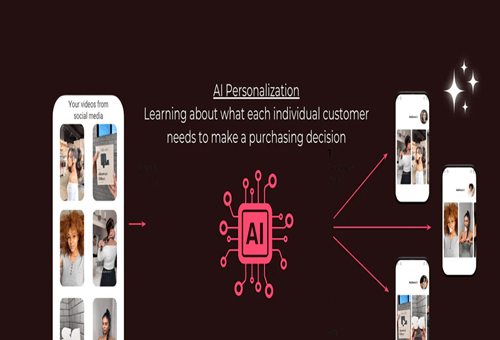
2. How AI Personalizes the Entire Shopping Experience

One-size-fits-all stores are dead. AI makes every visitor feel like the store was built just for them.

🔹 Smart Product Recommendations

AI engines suggest products based on:

  • Browsing behavior

  • Similar customer profiles

  • Purchase history

💡 Example:
A user checks sneakers → AI instantly pushes socks, shoe cleaners, or premium versions.

Result: Higher AOV (Average Order Value) without extra ad spend.


3. AI Predicts Who Will Buy (and Who Won’t)

AI segments users into buckets like:

  • Ready-to-buy

  • Price-sensitive

  • Window shoppers

  • About-to-leave

Then it reacts instantly:

  • Discount popups for hesitant users

  • Urgency messages for hot buyers

  • Exit-intent offers before bounce

This alone can recover 20–40% abandoned carts.


4. Dynamic Pricing = More Profit, Less Guesswork

AI tracks demand, competition, and user behavior to:

  • Adjust pricing in real time

  • Offer personalized discounts

  • Avoid unnecessary price cuts

So instead of discounting everyone, AI discounts only when needed.

That’s how brands protect margins and scale revenue.


5. AI-Powered Search = Faster Decisions

Most customers who use search bars are high-intent buyers.

AI-powered search:

  • Understands typos & natural language

  • Shows best-converting products first

  • Personalizes results per user

Translation?
Less friction = faster checkout = more money.


6. Marketing That Actually Converts (Not Just Looks Cool)

AI connects store behavior with marketing channels:

🔹 Email & WhatsApp Automation

  • Product viewed but not bought → reminder

  • Cart abandoned → smart follow-up

  • Repeat buyer → loyalty reward

🔹 Ads That Learn

AI syncs with Meta & Google Ads to:

  • Kill low-performing ads

  • Scale winning audiences

  • Improve ROAS automatically

Brands using AI-driven ads often see 2x–4x ROAS.


7. Real Revenue Impact: Why 30%–100% Growth Is Realistic

AI doesn’t magically add traffic — it optimizes every visitor.

Here’s how the math works:

  • +15–30% conversion rate

  • +20–40% AOV

  • +25% repeat purchases

Stack those together and boom 
30%–100% revenue growth without doubling ad budgets.


8. AI Tools That Work Insanely Well with Shopify & WooCommerce

Some popular AI use cases:

  • Product recommendation engines

  • Heatmaps & session recordings

  • Predictive analytics dashboards

  • Chatbots trained on store data

  • Smart upsell & cross-sell tools

The key isn’t tools — it’s strategy + correct setup.


Final Thoughts: AI Isn’t the Future, It’s the Advantage

AI doesn’t replace humans. It replaces guesswork.

If you’re running a Shopify or WooCommerce store and not using AI, you’re leaving serious money on the table. The brands winning globally aren’t louder — they’re smarter.

AI reads behavior.
AI predicts intent.
AI prints revenue.

And yeah… it’s just getting started .

AI SEO 2026

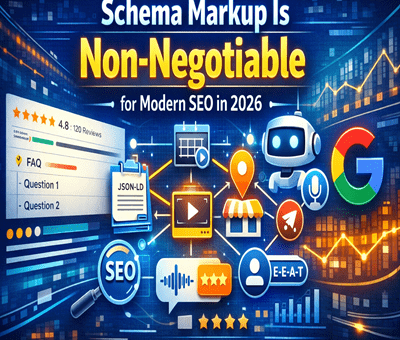
Schema Markup Is Non-Negotiable for Modern SEO in 2026

Schema Markup Is Non-Negotiable for Modern SEO in 2026

SEO, WordPress

SEO in 2026 isn’t just about keywords, back-links, or page speed anymore. If your site doesn’t speak Google’s language, you’re basically whispering in a noisy room. That language is Schema Markup, and at this point, it’s not optional — it’s mandatory.

Let’s break down why schema markup is a must-have for modern SEO and how it directly impacts rankings, visibility, and clicks.


What Is Schema Markup (Quick Recap)

Schema markup is structured data added to your website’s code that helps search engines understand your content contextually, not just textually.

Instead of guessing, Google knows:

  • This is a product

  • That is a review

  • This page answers a question

  • This article is written by an expert

And when Google understands better, it rewards better.


Why Schema Markup Is Non-Negotiable in 2026

1. Search Is Now AI-Driven (Not Keyword-Driven)

Google’s AI models prioritize context, intent, and entities. Schema markup feeds that understanding directly.

No schema = less clarity = weaker visibility.


2. Rich Results = Higher CTR

Schema enables:

  • FAQ dropdowns

  • Star ratings

  • Product prices

  • Event dates

  • How-to steps

These rich results steal attention on the SERP and massively improve click-through rates — even without ranking 1.


3. Voice Search & AI Overviews Depend on Schema

Voice assistants and AI-generated search summaries pull data from structured sources.

If your content isn’t structured, it won’t be selected.

Schema markup increases your chances of:

  • Being cited in AI answers

  • Appearing in voice search responses

  • Showing up in Google AI Overviews


4. E-E-A-T Signals Are Stronger With Schema

Experience, Expertise, Authority, Trust — Google cares deeply.

Schema helps validate:

  • Author credentials

  • Business legitimacy

  • Reviews & ratings

  • Organization details

Basically, schema helps you prove you’re legit, not just claim it.


5. Zero-Click Searches Are Rising

More users get answers directly on Google.

Schema ensures:

  • Your brand still appears

  • Your site gets attribution

  • You stay visible even without a click

If clicks go down, branding and presence matter more than ever.


Must-Have Schema Types in 2026

If you’re serious about SEO, these are table stakes:

  • Organization Schema

  • Website Schema

  • Article / Blog Posting Schema

  • FAQ Schema

  • Breadcrumb Schema

  • Product Schema (for eCommerce)

  • Review & Rating Schema

  • Local Business Schema

Bonus: How To and Video schema if relevant.


Common Schema Mistakes to Avoid

  • Adding schema but not matching page content

  • Using outdated or invalid schema types

  • Forgetting to test with Google’s Rich Results Test

  • Auto-generated spam schema

Bad schema is worse than no schema. Accuracy matters.


Final Thoughts

In 2026, SEO without schema markup is like building a website without SSL — outdated and risky.

Schema markup:

  • Improves visibility

  • Increases CTR

  • Powers AI search

  • Strengthens trust

  • Future-proofs your SEO

If you want Google to understand, trust, and promote your content — schema markup isn’t a “nice to have”. It’s non-negotiable.


SEO VS AEO VS GEO

Shopify Quietly Killed the App Gold Rush in 2026.

Shopify Quietly Killed the App Gold Rush in 2026.

Shopify

Shopify Quietly Killed the App Gold Rush in 2026.

And somehow… made everyone richer.

If you were deep in the Shopify ecosystem before 2026, you remember the app gold rush era.
Build a half-decent app, slap on a $9.99/month price, throw money at ads, and pray merchants stick around longer than one billing cycle.

It worked.
Until it didn’t.

In 2026, Shopify didn’t announce some dramatic reset. No big keynote. No viral blog post.
They just changed the rules quietly.

And the chaos stopped.


The App Gold Rush Was Low-Key Broken

Before 2026, the Shopify App Store had three major problems:

  • Too many apps doing the same thing
    20 apps for popups. 15 for subscriptions. 10 for reviews. Merchants were overwhelmed.

  • Short-term thinking
    Many apps were built to monetize fast, not to last.

  • Merchant burnout
    $5 here, $15 there, suddenly a store owner was paying ₹20k/month just to keep their stack alive.

More apps ≠ more value.
It was noise.


What Shopify Changed (Without Making Noise)

Shopify didn’t ban apps.
They raised the floor.

1. Native Features Ate Weak Apps Alive

Shopify rolled core features directly into the platform:

  • Better analytics

  • Stronger checkout customization

  • Built-in automation

  • Smarter email + customer flows

If your app was just a “nice-to-have” it was over.

2. App Store Quality Became Non-Negotiable

Approval got stricter.
Performance mattered.
UX mattered.
Long-term value mattered.

Spammy, bloated, or redundant apps slowly disappeared.

3. Revenue Models Got Smarter

Developers shifted from:

“$9/month for everyone”
to
“Charge based on value delivered”

Usage-based pricing.
Revenue share alignment.
Fewer installs, higher ARPU.


Why Merchants Won

Merchants didn’t need 12 apps anymore.

They got:

  • Faster stores

  • Fewer subscriptions

  • Cleaner dashboards

  • Tools that actually worked together

Instead of managing tech, they focused on selling.

Less chaos = more profit.


Why Developers Won (Yes, Really)

At first, it hurt.
Installs dropped.
Easy money dried up.

But serious developers stayed—and leveled up.

Now:

  • Fewer competitors

  • Higher-quality customers

  • Longer retention

  • Real businesses, not side hustles

One great app > ten mediocre ones.

Developers stopped chasing virality and started building infrastructure.


Why Shopify Won the Biggest

This move did three things for Shopify:

  1. Reduced platform bloat

  2. Increased merchant trust

  3. Strengthened ecosystem defensibility

Shopify isn’t just a tool anymore.
It’s an operating system for commerce.

And operating systems don’t need a million plugins—
they need the right ones.


The Real Takeaway

The app gold rush didn’t end because apps failed.
It ended because the platform matured.

2026 wasn’t about killing opportunity.
It was about killing shortcuts.

And in the long run:

  • Merchants made more

  • Developers earned better

  • Shopify became stronger

Quiet changes.
Massive impact.

Sometimes the best revolutions don’t trend on X.
They just work.

Hire Shopify Developer India